You spent weeks building your Roblox game. The mechanics are tight, the map is polished, and your friends say it’s one of the best games they’ve played. Then you publish it — and nothing happens. A handful of visits, barely any plays, and the server sits empty.
Most developers blame the algorithm. The real culprit is almost always staring them in the face before a single player ever clicks: the thumbnail.
Your thumbnail is the single most important piece of marketing your Roblox game has. It’s the first thing a player sees when scrolling through the discovery page, and it has less than a second to earn a click. If it doesn’t stop the scroll, the game doesn’t get played. It doesn’t matter how good the game is underneath.
The Psychology Behind the Click
Players on Roblox are making micro-decisions constantly. They’re not carefully evaluating your game — they’re reacting. The brain processes visual information in roughly 13 milliseconds, which means your thumbnail triggers an emotional response before the viewer is even consciously aware of it.
Top-performing thumbnails tap into one or more of these triggers:
Curiosity — Something is happening in the image that makes the player want to know more. A dramatic scene, an unexpected character, a location that raises a question.
Aspiration — The image shows something the player wants to be or have. A powerful avatar, rare items, an epic environment. It sells a feeling, not just a game.
Urgency and FOMO — Text overlays like “NEW UPDATE” or “LIMITED EVENT” create the fear of missing out. Even without text, a densely packed, action-heavy image communicates that things are happening right now.
Familiarity with novelty — Players are drawn to styles they recognize, but with a twist. A battle royale thumbnail needs to look like a battle royale, just more impressive than the competition.
Understanding these triggers is the foundation. Execution is everything else.
What High-CTR Thumbnails Have in Common
Click-through rate (CTR) is the metric that really matters at the discovery stage. When researchers and experienced Roblox developers analyze what separates high-CTR thumbnails from low ones, the same patterns show up repeatedly.
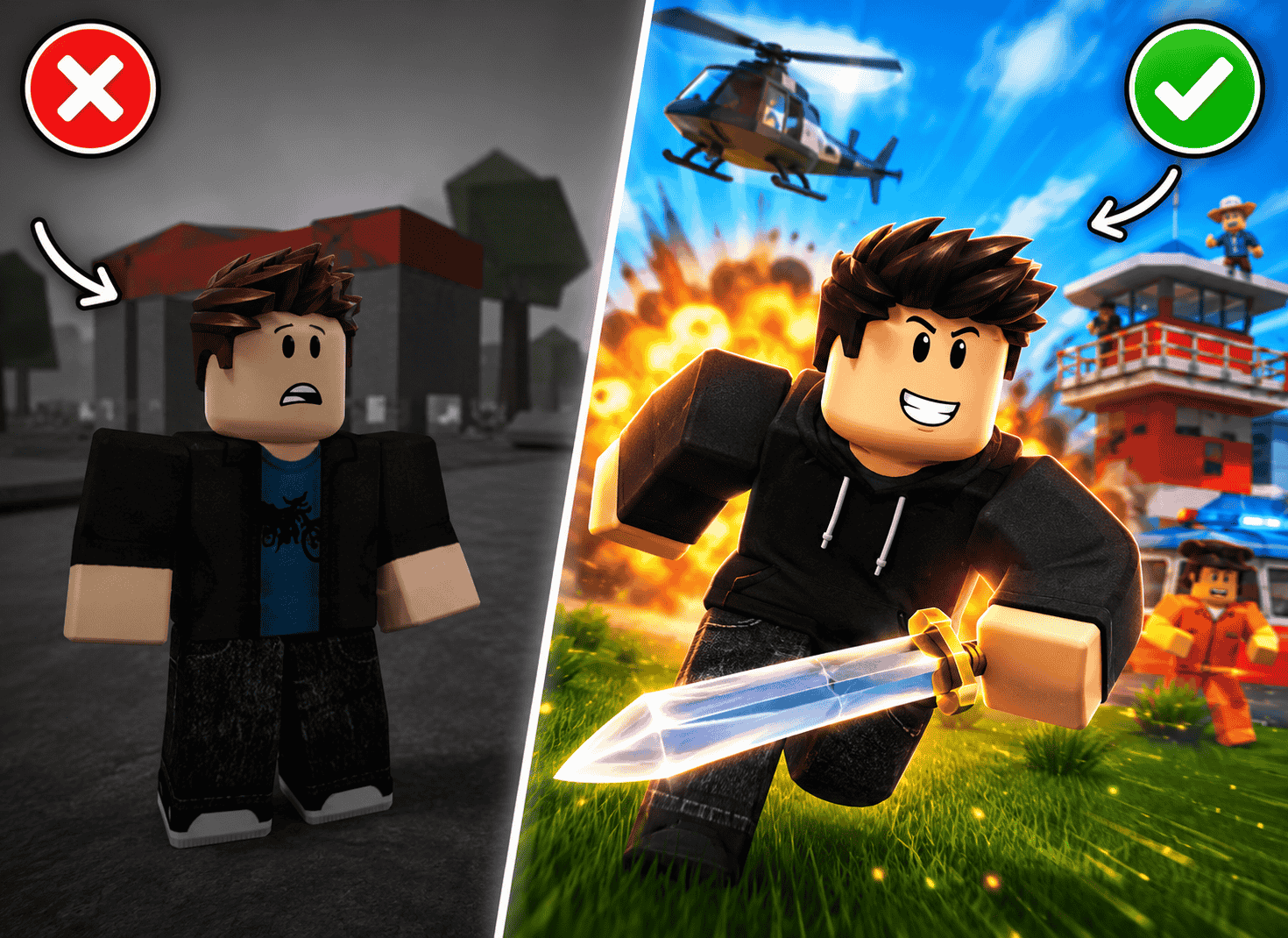
A single focal point. Thumbnails that try to show everything tend to communicate nothing. The best ones have one dominant subject — usually a character or a dramatic scene — that immediately draws the eye. Everything else supports that focus without competing with it.
Contrast and color. Roblox’s game page is visually noisy. Thumbnails that use high contrast and punchy, saturated colors cut through the noise more effectively than muted, realistic palettes. This is especially true for action and adventure games. Think vivid blues, hot oranges, electric greens — colors that pop at thumbnail size.
Legible text at small sizes. If you’re using text on your thumbnail, it needs to be readable at the size a mobile player sees it. That’s roughly 180×100 pixels on a phone screen. If you have to squint, it’s already failing.
Faces and expressions. Human (and humanoid) faces with exaggerated expressions perform consistently well across almost every Roblox genre. Players respond to emotion. An avatar with an expression of shock, determination, or excitement invites the viewer into the story.
Depth and dimension. Flat 2D arrangements look amateurish compared to thumbnails with a sense of depth — a foreground subject, a midground action, and a background that sets the scene. This is where professional GFX has historically had a massive advantage over simple screenshots.
The True Cost of Bad Graphics
Before AI tools came along, developers had a few options for quality thumbnails. They could learn Blender and spend days modeling and rendering a scene. They could hire a GFX artist — which, depending on the quality, ran anywhere from a few hundred to over a thousand Robux per thumbnail. Or they could take a screenshot and hope for the best.
None of these were great options for indie developers or small studios. Learning Blender has a steep learning curve that takes months to climb. Commissioning GFX work adds up fast, especially when you need to refresh your thumbnail for every update. And screenshots almost never capture the dramatic, polished look that competes with established games.
The real cost isn’t the Robux you spend, though. It’s the players you never get. A game with a mediocre thumbnail might convert 1–2% of impressions into clicks. A great thumbnail can push that to 5–8% or higher. On a game with tens of thousands of impressions, that difference compounds into massive gaps in player counts, engagement, and ultimately revenue.
How AI Changes the Equation
AI-powered GFX generation has fundamentally changed what’s possible for solo developers and small teams. Tools like BloxGFX (https://bloxgfx.com) let you describe the thumbnail you want in plain English and generate studio-quality results in seconds — no Blender, no design background, no waiting days for a freelancer to deliver.
The workflow is simple: type a prompt like “epic battle scene with lava, dark fantasy, two armored characters fighting, dramatic lighting” and within about eight seconds you have multiple results to choose from. You can iterate with follow-up prompts — “make the sky darker,” “add a dragon in the background,” “change the color scheme to blue and gold” — until the output is exactly what you envisioned.
This isn’t just about speed, though the speed matters. It’s about creative freedom. Developers can now test multiple thumbnail concepts in minutes, something that was simply not practical before. And because you can generate in batch, you can A/B test different styles across updates and actually figure out what your specific audience responds to.
A Practical Thumbnail Testing Framework
If you’re serious about improving your game’s performance, thumbnail testing should become a regular part of your development cycle.
Start by establishing a baseline. Note your current impression-to-click conversion rate (Roblox provides this data in Creator Hub analytics). Then generate two or three alternative thumbnails with meaningfully different concepts — not just minor variations, but different focal points, color schemes, or compositions.
Swap your thumbnail after a few days of consistent data, give the new version the same amount of time, and compare. Do this systematically over a few update cycles and you’ll develop a real intuition for what works with your audience.
Pay attention to the genre signals your thumbnail is sending, too. Players have strong genre expectations. A horror game thumbnail should feel unsettling. A simulator should communicate abundance and progression. A PvP game should feel fast and aggressive. If your thumbnail is sending mixed signals about what kind of experience awaits, players who do click are more likely to leave quickly — and high bounce rates hurt your ranking.
Beyond the Thumbnail: Completing the Visual Package
Once your thumbnail is working, extend that creative consistency to the rest of your game’s visual identity. Your game icon is the second thing players see, and it needs to feel like it belongs to the same world as your thumbnail. Game pass icons and badge art that match your overall aesthetic make your store page look professional and build trust with players.
Consistent, high-quality visual branding signals that the game behind it is cared for and actively maintained. Players make that judgment call before they ever touch a controller.
Final Thoughts
Your Roblox game deserves to be discovered. You put real effort into building it, and a weak thumbnail is a wall standing between your game and the players who would genuinely love it.
The barrier to great game art has never been lower. With AI generation tools that produce results in seconds, there’s no good reason to leave your first impression to chance. Test boldly, iterate fast, and treat your thumbnail as seriously as you treat your game design — because for everyone who hasn’t found your game yet, it’s the only thing that matters.
Ready to create your first AI-generated thumbnail? BloxGFX (https://bloxgfx.com) gives you 3 free credits every month — no card required.